


Architecting a desktop app in 2026
This article is about applying classic software architecture principles to Fileside, a modern desktop app built with Electron, TypeScript and React. We’ll be talking mostly about the high-level structure, and how to leverage ideas from the Hexagonal, Onion, Clean, Explicit and Domain-Driven architectural styles.
Introduction
Why care about software architecture in the era of highly capable AI coding agents? Can’t we just let the agents power through and be done with it?
I’d argue that it matters as much, if not even more, than before. Complexity is always the main foe of any growing codebase, and careless agent use now lets you amass huge tangles of accidental complexity faster than ever before.
A codebase that’s hard to understand for humans is also hard to understand for agents. A cleanly partitioned one, where layers, dependencies and relationships are obvious, guides both humans and agents towards staying principled when making changes, rather than taking the shortest route to working code.
By ignoring architecture, we often end up with software that is both rigid and fragile at the same time. Code that is difficult to change without breaking things. The job of the architecture is to deliberately build in flexibility, to leave as many options open as possible, to maximize the number of decisions that can be postponed.
While it’s easy to make fun of the architecture astronauts of the 90s and early 00s with their AbstractBeanFactoryServletAdapters and their love of business-casual dress, there are some genuinely useful ideas in this body of work, which have tended to get overlooked in the period since functional became trendy and object-oriented uncool.
So let’s get down to business and take a look at the specifics of applying some of these ideas to Fileside, a cross-platform desktop file manager that recently reached version 2.0.
The tech stack
The Electron framework is the main constraining factor on how we need to structure the app, since it enforces a specific multi-process architecture. It has a main process that runs in a Node.js environment, which spawns separate renderer processes to open application windows. These renderers are analogous to Chromium browser tabs, and run web code. The main process can integrate native code for accessing operating system APIs directly via Node’s C++ addon capability. We also have the possibility of spawning secondary worker processes from main. Communication between processes must happen via Inter-Process Communication (IPC).
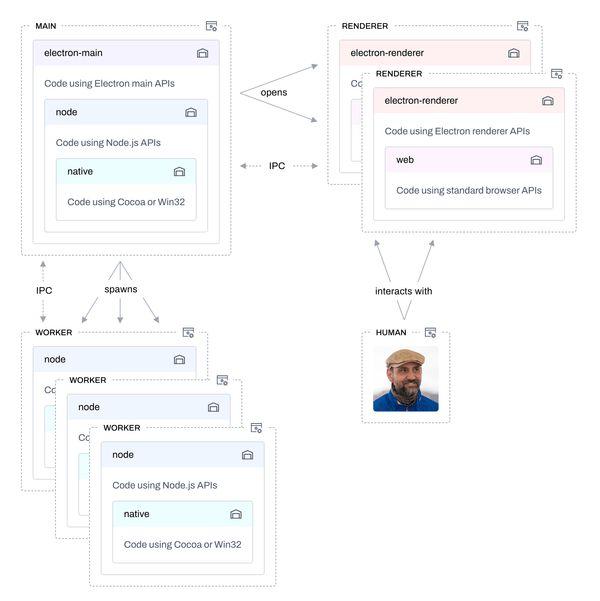
An Electron app can therefore be viewed as a distributed system and thinking of the pieces in terms of backend (main) and frontend (renderer) can help. But here the backend and frontend live on the same machine, and IPC between them is much faster than HTTP over the Internet.
Unlike a normal web browser, renderer processes can also run Node code, which was the standard approach in earlier versions of Electron (and which Fileside 1 made use of), but has since become strongly discouraged for security reasons. Current best practice is to keep renderers sandboxed. i.e. completely free of Node code and its ability to access the local system (which is the model Fileside 2 follows).
Fileside 2 runs core app code within main’s Node environment (including a C++/Objective-C addon for native OS access) and individual React apps in each renderer’s web environment.
(As an aside, the choice of React seemed like a good idea way back when, but suffice to say that had I started the project today I would shy away from React with its incessant re-rendering and horribly designed hooks paradigm.)
The pain points
When I first started building Fileside, I didn’t pay enough attention to architecture.
“A file manager? How hard can it be?”
However, both the domain and Electron were new to me at the time, so I didn’t know what I didn’t know. Predictably, as the 1.x series progressed and evolved more features, they became increasingly more difficult to slot into a suboptimal design.
Through this process, I gradually gained a better understanding of where the architecture fell short. The pain points of the v1 codebase became evident:
- Individual modules had become entangled and difficult to change in isolation.
- 3rd party library code had become sprinkled throughout application code, making swapping in alternative implementations hard.
- Multiple window support was never properly designed, with most state owned by renderers, leading to bugs and inconsistencies when having more than one app window open.
- Code intended for different environments had got mixed up, making testing hard and violating best security practices.
- Redux-style state management emitting the whole state on each update had become increasingly restrictive and did not scale well.
- React being React leading to too much logic and state management creeping into views, which had become more and more fragile as the app grew.
- Global string-based IPC component that was shared among all features.
Having said this, we got some things right that were worth keeping, among them the undo system using the Command pattern, the one-way flow with UI as a function of state, and a clear separation of file system operations from the rest of the app.
The wishlist
Thus, an idea was taking shape of what qualities the supporting architecture needed to have for v2:
- Layers with explicit dependency rules between them, and modular features with a high degree of independence.
- Injected dependencies instead of direct imports, with the flexibility to easily swap things in/out across clearly defined boundaries.
- Clear state ownership across windows and processes.
- Code files organised by environment, and sandboxed renderers stripped of Node code.
- Fine-grained reactivity using atomic stores compartmentalised per feature.
- All state management pulled out of React, leaving views as simple props-to-DOM transformers.
- Each feature owning and managing its own IPC channels in a typesafe manner.
The overarching goal was an unentangled, modular structure that is easier to understand, modify and reason about.
The cure
So how were we going to begin to fulfill these wishes by leveraging established software architecture practices?
A good starting point was Herberto Graça’s series of articles The Software Architecture Chronicles and his distillation of Domain-Driven Design, Hexagonal, Onion and Clean Architectures into the Explicit Architecture.
Another source of inspiration was Visual Studio Code, probably the best-architected example of a large open-source Electron app in existence, from which we lifted the approach to dependency-injected services and feature-internal IPC.
From the modern frontend stack, we borrowed the ideas of stores and reactive signals.
For more on background and references, see the literature section at the end.
Dependencies, dependencies, dependencies
How we let things depend on other things is absolutely fundamental to any discussion about software architecture. Dependencies are important because the more things that depend on something, the harder that something becomes to change. And the more sprawling the dependency graph becomes, the harder it gets to predict the consequences of those changes.
To tame this looming complexity, we normally structure systems into layers and define rules about how dependencies are allowed to flow between them. These dependency relations are fixed at compile time, i.e. they represent the system’s static structure.
Onion rings
At the highest level, Fileside employs a traditional layered stack, with one dependency inversion tweak. In increasing order of specificity, the layers are:
- lib: General helpers for things like parsing, conversion, enumeration of strings, arrays, objects, numbers etc.
- system: Core domain entities and logic for disk access, file transfers, job, process handling etc. No UI allowed here.
- app: App features and everything they need to render their UI.
- infra: Infrastructure code handling the details of how to talk to external systems, mostly via 3rd party libraries.
- boot: Startup code that wires everything together to bring up the full application.
Dependencies flow downwards from 5 towards 1. A layer is free to import any code from its own or lower layers, but never anything from a layer above it. The lib layer (1) can only depend on the programming language itself. The boot layer (5) can depend on everything else.
Taking a leaf from the Onion and Clean architectures, we represent this structure as an onion composed of a series of concentric rings.
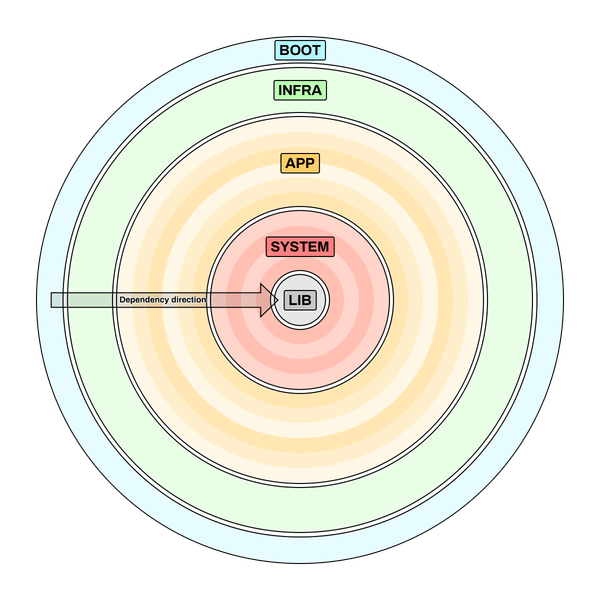
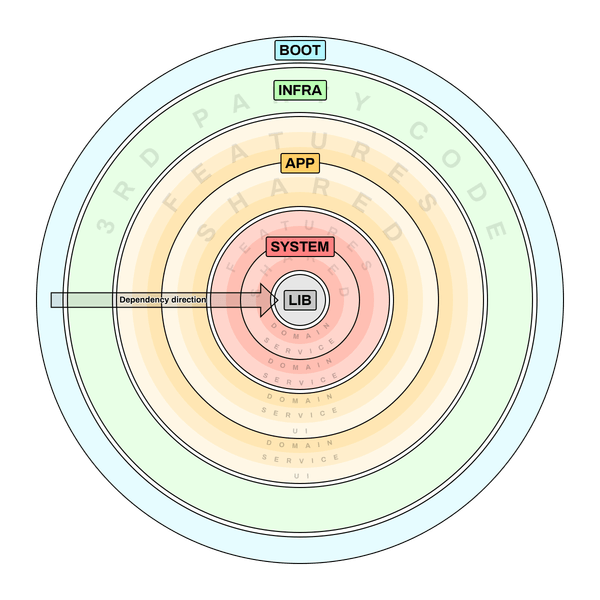
The system and app layers (2 and 3) make up the application itself with the other layers as supporting actors. Most diagrams represent these two as just the “application layer”, but we isolate the core system concerns from the higher-level app concerns to make a clear cut between UI code and system code. More on this later.
These two application layers also come with a two-part internal layering in the form of features and shared, where features can depend on shared but not vice versa. Inside these sublayers, code is layered based on whether it’s UI, service or domain code.
Inverting control
To keep these core application layers nimble and decoupled, they make use of the Inversion of Control design pattern through the Ports & Adapters technique from the Hexagonal Architecture as formulated by Alistair Cockburn. What this means is that system and app code can still drive flows that require infrastructure code without depending on the infra layer or knowing anything about how it’s implemented. In other words, the control is inverted relative to the static dependency direction.
The beauty of this technique is that it keeps the app’s special sauce free from getting tangled up with the details of external libraries or frameworks. It not only makes it much easier to swap out libraries or support different implementations side-by-side, it also greatly aids testing of the app code in isolation.
So how does it work in practice? Each application layer defines a number of ports, essentially just interfaces describing a set of external functionality that the layer needs and can assume is available somewhere. The layer’s code is then implemented against those interfaces without caring about who supplies the implementation. The concrete implementations live in the infra layer in the form of adapters, which translate the ports’ interfaces into whatever form the infrastructure libraries require. This way the lower layer only has a dependency on itself (the port), and the infra layer only has a downwards dependency on the same port interface. It’s the job of the topmost boot layer to instantiate and inject the appropriate adapters into the lower layers when the app starts up.
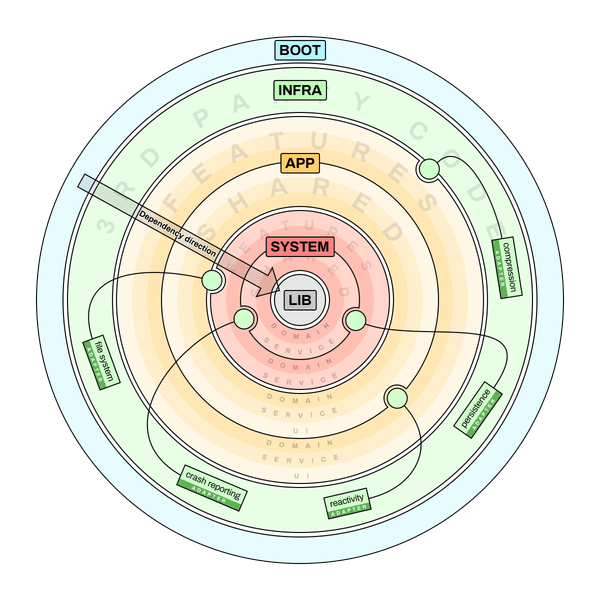
Note that while the diagram only illustrates one adapter per port, there can also be several. This is how we can support for example multiple different persistence mechanisms or file systems through the same port interface with zero changes to the system layer.
The UI as first-class citizen
In the original ports & adapters concept, the UI is also considered an adapter that lives outside of the application layer itself. In that model, the word “application” is used to mean just the business logic and the use cases around it, with a UI being just one way of accessing it. That didn’t seem all that appropriate for a desktop app where the UI is very much its raison d’être. The UI layer in Fileside isn’t interchangeable infrastructure, it’s part of the special sauce, and the application would be meaningless without it.
So we are modifying the adapter rule by welcoming the UI in as a part of the app layer. The dependency discipline enforced by making the UI an adapter is instead kept through our app/system layer split, and through our inner nested rings, as we shall see in the next section.
(One could of course still treat the specific UI framework employed as an adapter, and describe the application views in a framework-agnostic manner via ports. Fileside doesn’t go quite that far, we compromise and allow the React dependency into the app layer for pragmatic reasons.)
Deeper into the onion
Robert C. Martin promotes the idea of screaming architecture: a system’s organisational structure should make it instantly obvious what domain it’s about, rather than be divided up along the lines of technical framework categories. We’re deliberately breaking this (rather silly) rule at the top level with our layers, but once we get inside one, it screams.
Some examples of the kind of names we see in each layer:
- lib: event, date, uri, geometry, validation, version, deque, json
- system: file, job, process, logging, path, signal
- app: layout, lister, preview, query, archival, transfer
- infra: Electron, Node, Cocoa, Win32, nanostores, conf, yauzl, marked
- boot: boot-main, boot-app-window, boot-worker
The two application layers system and app are partitioned horizontally into named features, that each pertain to a specific capability. The features can be naturally depicted as wedges or slices carved out of each layer, with each one spanning the internal UI, service and domain rings.
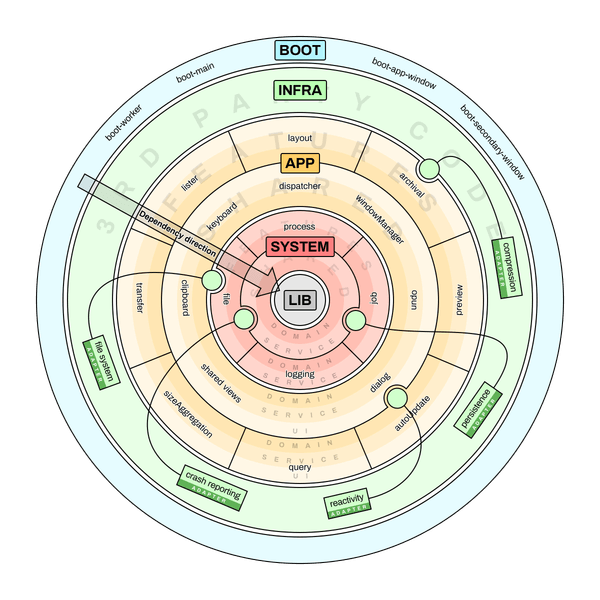
The features are what DDD calls bounded contexts, and the shared sublayer is its shared kernel. The shared layer is really just a special feature on which all other features can depend, but it should be considered its own sublayer since that makes it clear that it cannot depend on any of the individual features above it. All the common constructs that many features need to do their job live here.
The anatomy of a feature
A feature is a slice of functionality that should exhibit high cohesion within, and low coupling outside. Well-partitioned features help reduce complexity by shrinking the mental model a developer must hold (or the context a coding agent must gather) to successfully make a change. Each feature manages dependencies internally through a series of concentric rings (surprise), from innermost to outermost:
- domain: Domain objects and self-contained operations on them.
- service: Dependency-injected singletons that act as facades and orchestrate flows belonging to a specific feature.
- ui: The user interface, further divided into three strata:
- command: Use cases encapsulated into command objects that are dispatched from the vodel layer and stored in a history for undo.
- vodel: View models bridging views to commands and services.
- view: View components concerned only with rendering and user input.
Features in the app layer sport all five rings, while system layer features only have domain and service rings. Zooming into one feature wedge, we can see what kinds of constructs live in each ring. Here too, dependencies flow only inwards, towards the centre of the onion. If code in the app layer imports from the system layer, it should not reach above its own ring, e.g. the app’s domain ring should avoid importing from system’s service ring. Likewise an app feature’s service ring should avoid importing from app shared’s view ring.
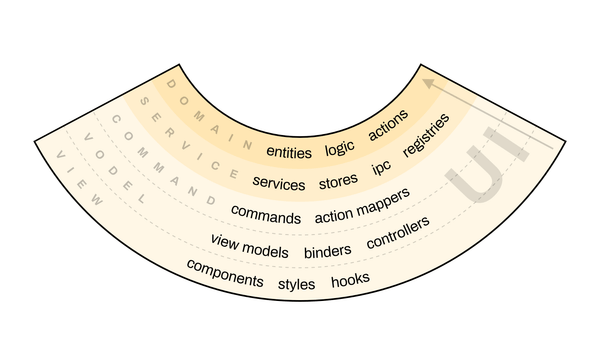
This gives us a defined structure to hang every new feature on, making sound dependency management enforced by design. Not every feature is going to need all rings, but that’s fine.
Separation of concerns
The clear split of any app feature into five separate rings makes it explicit where different concerns belong. From top to bottom:
view: Anything visual goes in the view ring. A view component renders output to the screen, and registers event handlers for input, which it immediately forwards to the vodel ring below without further processing. We eschew usage of built-in React state management via useState or setState in favour of letting vodels handle it. By keeping view as the topmost ring, we ensure that any logic in underlying rings can be unit tested without bringing in a UI framework.
vodel: The vodel ring is what allows us to keep views simple and free of both state and logic. Instead, this is the responsibility of binders, special classes that bind input events to controller functions dispatching commands downwards, and translate signal emissions coming back up into props. Views own their vodels and use a custom useVodel() hook to bridge them into the React universe.
command: Commands represent undoable use cases that can be carried out by calling into services in the ring below. They have methods for do(), undo() and redo(), and can hold whatever state is required to be able to undo. All commands are dispatched through a central funnel, similar to the Command Bus pattern from enterprise architecture. Here they are executed and siphoned off to an UndoService which stores them in a history. The undo service itself handles requests to undo or redo.
service: The service ring contains services, stores, and any utilities they need. Services do the work commands request by coordinating domain entities and functions, communicating with other processes and services, and updating reactive state held in the feature’s stores.
domain: Finally entities, types, definitions and algorithms modelling the domain of the feature go in the domain ring. For an app feature, this can also be types relating to view concerns, such as a LayoutState object for example.
IPC and environment isolation
Since we’re in a distributed system, we need a clear strategy for handling the different environments and the processes across which they are spread.
A potentially surprising aspect of the feature design is that they can span environments. A feature bundles up both renderer, main and worker code required to do its job, alongside the IPC protocols needed for communicating between the processes involved. This pattern was borrowed from Visual Studio Code.
Concretely, this means that most features have a ClientService which talks over IPC with a ServerService that carries out work that can’t be done in the client. Generally a client service runs in a renderer and a server service in main, but they don’t have to. Main can also have client services talking to server services in secondary worker processes for example.
IPC messages boil down to serialised JSON objects with string IDs, so are inherently untyped. But through a set of API construction helpers, we can create typesafe function interfaces that map onto the exported methods of each service. That way client->server IPC requests just look like a standard TypeScript await call in client code, and server IPC emits look like regular event handlers in the client.
There are two kinds of IPC available in the app: Electron IPC used between main and renderer, and Node’s send/listen API used between main and workers. Here the ports & adapters technique comes in very handy, as we just wrap both IPC kinds as adapters in the same IMessagingClient and IMessagingServer ports, and all services can communicate interchangeably over either channel kind.
To keep track of which code inside a feature can run where, filenames get one of a set of predetermined suffixes when it is written against APIs that are only available in a specific environment. The absence of a suffix indicates agnostic TypeScript code that can run anywhere.
-web: relies on web APIs or browser globals-node: relies on Node APIs-main: relies on Electron main APIs-rend: relies on Electron renderer APIs-prel: relies on Electron preload globals
This way we can see at a glance if something imports something it shouldn’t, and the import rules can be enforced by custom linter rules.
Modularity
Features within a layer should aim to be as self-contained as possible, but are allowed to talk to each other. A service acts as a feature’s public facade that lets others interact with it. The facade is an interface whose implementation is handed out by the dependency container, so a feature will never import from another feature directly; it will just inject it and interact with its facade.
This keeps features decoupled and makes it easy for tests to swap out a service for a mock that implements the facade interface. It also makes it easy to swap feature implementations as long as they adhere to the required interface. This is polymorphism through design by contract rather than class inheritance.
Features also own and register their own actions, definitions identifying a use case that maps to a command, and bundle their own IPC protocols as mentioned. This makes features almost fully pluggable.
State ownership
We now have multiple levels of state with different lifetimes, from most persistent to most ephemeral:
- Saved state, written to disk by main.
- App-global state, held in a main-process store.
- Window-specific state, held in a renderer-process store.
- View-specific state, held in a vodel.
By deliberately assigning each piece of state to the level where it belongs, we can solve the issues around multi-window state. Global state that must be available in each window at all times, like the list of available layouts, is emitted from main as IPC events, so that each window can stay in sync by subscribing. Other global state, like settings, can be held only in main and requested on-demand through an IPC call. State that’s needed by multiple views in a window is held in a renderer-side feature store, and state only needed by a single view is held in a vodel.
Window-specific state in each renderer is held as reactive signals, subscribed to by vodels which emit new props to views so that they update automatically when state they represent changes.
Software architecture is soft
Unlike physical architecture, software architecture remains malleable after it’s been put in place. Therefore, it remains a work in progress throughout a project’s lifetime, and any description is no more than a snapshot in time.
What we’ve just gone through represents one solution arrived at through multiple iterations of trial & error, that happens to work reasonably well for Fileside’s needs today. It’s highly likely that better solutions exist, and very probable that I have misunderstood or misapplied some concepts. I suspect that the current incarnation might be unnecessarily complex, and that we could probably achieve many of the same goals with fewer layers. But I’d rather err on the side of being too explicit than too lax.
Software architecture is a multi-faceted and abstract thing that’s hard to get a firm grasp of, and there’s often no definite right or wrong answers. There are many potential ways to achieve the desired goals, and often you don’t discover what the best way forward is without first implementing something and afterwards realise where the friction is.
A note on the literature
A lot of the literature on software architecture, at least since the 90s, comes with built-in assumptions about an enterprise setting where the backend is king, a database is a foregone conclusion, and the domain is a dense thicket of business rules.
The ideas expounded therefore don’t always map that well onto highly interactive applications where frontend and UX concerns take centre stage, and applying them to Fileside required some tweaking. But all of the following provided useful inspiration:
- Layered Architecture
- Alistair Cockburn - The Hexagonal Architecture (Ports & Adapters) Architecture
- Eric Evans - Domain-Driven Design
- Jeffrey Palermo - The Onion Architecture
- Robert C. Martin - The Clean Architecture
- Herberto Graça - Explicit Architecture
- Benjamin Pasero - Migrating VS Code to Process Sandboxing
To find papers dealing with the architecture of desktop GUI apps specifically, we have to go back to the 80s, when they were generally referred to as interactive systems. Some influential ones are:
- Trygve Reenskaug - Models, Views, Controllers (1979)
- Joëlle Coutaz - PAC: An Object-Oriented Model for Implementing User Interfaces (1987)
- Bertrand Meyer - Object-Oriented Software Construction (1988)
- John M. Vlissides, Mark A. Linton - Unidraw: A Framework for Building Domain-Specific Graphical Editors (1989)
- Brad A. Myers - A New Model for Handling Input (1990)
- The UIMS Tool Developers Workshop - A Metamodel for the Runtime Architecture of an Interactive System (1992)
These are of varying usefulness for our current problem, as they mostly deal with lower-level design patterns for structuring individual components or screens, rather than high-level system architecture. Some of them even go into the minutiae of how best to deal with input events from mouse and keyboard etc, details that mostly got abstracted away by frameworks in today’s world.
I have to give a shoutout to Bertrand Meyer though, creator of programming language Eiffel, who has a real flair for dry, erudite engineering prose.


